ip
Janet User Guide
Janet is an application for managing your daily tasks such as ToDos, Deadlines and Events. It is super easy to use and most importantly, it is FREE! Janet is optimized for use via a Command Line Interface (CLI) but also comes with a Graphical User Interface (GUI).
Quick start
- Ensure you have Java 17 or above installed in your computer.
- Download the latest
.jarfile from here. - Copy the file to the folder you want to use as the home folder for Janet.
- Double-click on the
.jarfile to start! (Alternatively, you could open a command terminal,cdinto the folder you put the jar file in, and usejava -jar janet.jarcommand to run the application.
Overview of features
- add tasks.
- mark/unmark tasks.
- delete tasks.
- find tasks.
- sort specific tasks.
- view schedule.
Adding ToDos
Adds a ToDo task to the list of tasks.
Format: todo TASK_DESCRIPTION
Examples:
todo feed my dogtodo grab lunch
If the ToDo task was successfully added, the message below will be displayed.
Got it. I've added this task:
T[ ] TASK_DESCRIPTION
Now you have TOTAL_NUMBER_OF_TASKS in the list
Adding Deadlines
Adds a Deadline task to the list of tasks.
Format: deadline TASK_DESCRIPTION /by DUE_DATE, take note that the DUE_DATE has to be
in yyyy-MM-dd HH:mm (24hr) format.
Examples:
deadline return book /by 2024-02-01 18:00deadline homework /by 2024-03-25 01:00
If the Deadline task was successfully added, the message below will be displayed.
Got it. I've added this task:
D[ ] TASK_DESCRIPTION (by: DUE_DATE)
Now you have TOTAL_NUMBER_OF_TASKS in the list
Adding Events
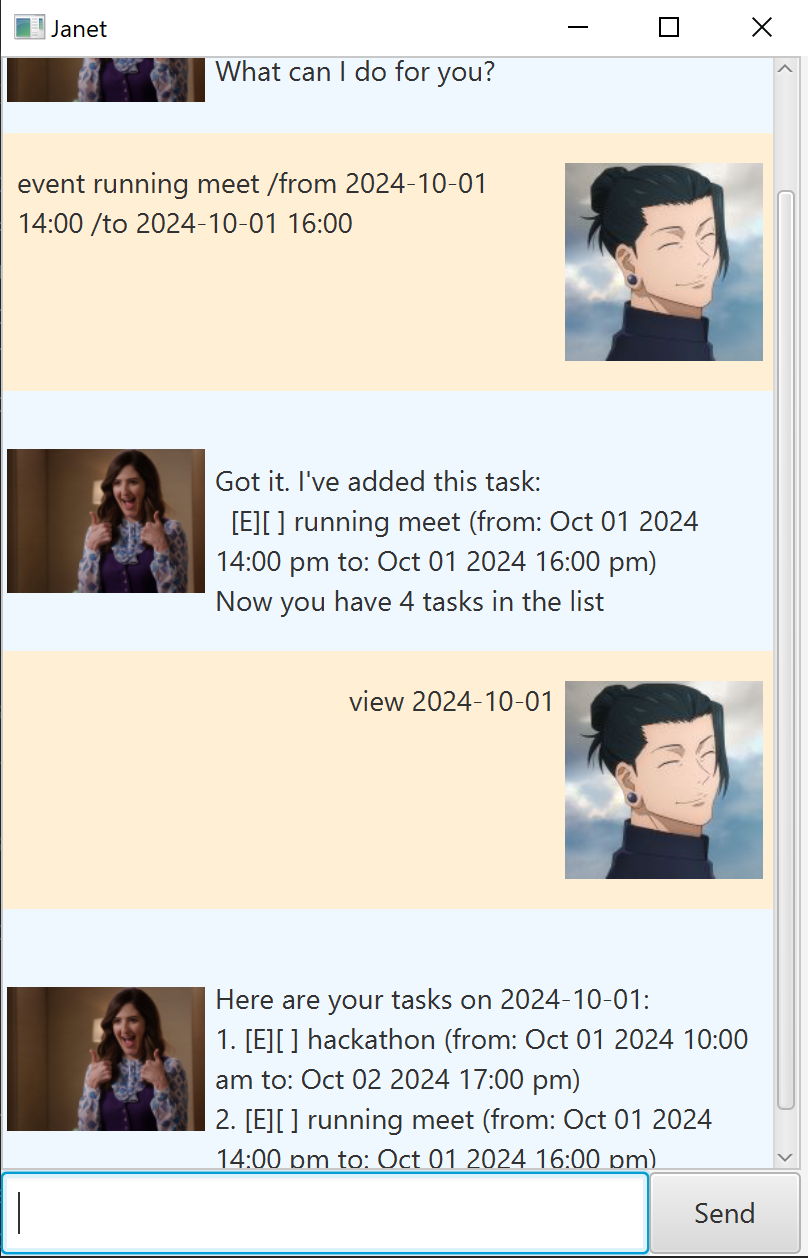
Adds an Event task to the list of tasks.
Format: event TASK_DESCRIPTION /from START_DATE /to END_DATE, take note that the START_DATE
and END_DATE has to be in yyyy-MM-dd HH:mm (24hr) format.
Examples:
event running meet /from 2024-03-04 09:00 /to 2024-03-05 22:00event project meeting /from 2024-11-01 09:00 /to 2024-11-01 21:00
If the Event task was successfully added, the message below will be displayed.
Got it. I've added this task:
E[ ] TASK_DESCRIPTION (from: START_DATE to: END_DATE)
Now you have TOTAL_NUMBER_OF_TASKS in the list
List all tasks: list
Shows a list of all the tasks.
Format: list
If there are existing tasks inside your list, a similar message like the one below
will be displayed.
Here are the tasks in your list:
1. T[ ] walk the dog
2. D[ ] homework (by: Sep 20 2024 22:00 pm)
If there are no existing tasks, a similar message like the one below will be displayed.
Here are the tasks in your list:
*** Current list is empty ***
Mark task: mark
Marks a task.
Format: mark TASK_NUMBER
Examples:
mark 2
The message below shows an example of a successful mark.
Nice! I've marked this task as done:
D[X] homework (by: Sep 20 2024 22:00 pm)
Unmark task: unmark
Unmarks a task.
Format: unmark TASK_NUMBER
Examples:
unmark 4
The message below shows an example of a successful unmark.
Ok, I've unmarked this task:
D[ ] homework (by: Sep 20 2024 22:00 pm)
Delete a task: delete
Deletes a task from the list of tasks.
Format: delete TASK_NUMBER
Examples:
delete 1
The message below shows an example of a successful deletion.
Noted. I've removed this task:
D[ ] return book (by: Sep 20 2024 22:00 pm)
Now you have 3 tasks in your list
Find tasks: find
Find tasks that contains keyword(s).
Format: find KEYWORD
Examples:
find bookfind running swimming reading
Below shows an example based of the command find running swimming reading
Here are the matching tasks in your list:
1. T[ ] get running shoes
2. E[ ] swimming meet (from: Sep 20 2024 12:00 pm to: Sep 20 2024 14:00)
3. D[ ] reading sale (by: Nov 3 2024 09:00 am)
Sort specific tasks: sort
Sort and view a specific task type in chronological order.
Format: sort TASK_TYPE
Examples:
sort deadline
Below shows an example based of the command sort deadline
Here are your sorted deadline tasks:
1. D[X] return book (by: Sep 18 2024 14:30 pm)
2. D[ ] homework (by: Sep 20 2024 22:00 pm)
3. D[ ] shopping sale (by: Nov 3 2024 09:00 am)
View schedule: view
View tasks in a schedule (ie., the schedule for a specific date)
Format: view DATE
Examples:
view 2024-09-17
Below shows an example based of the command view 2024-09-17
Here are your tasks on 2024-09-17:
1. D[ ] homework (by: Sep 17 2024 22:00 pm)
2. E[ ] swimming meet (from: Sep 17 2024 12:00 pm to: Sep 20 2024 14:00)
3. D[ ] project submission (by: Sep 17 2024 12:00 pm)
Closing Janet: bye
Exits the program and close the window manually.
Format: bye
Editing the data file
All the tasks data are saved in a text filed titled janet.txt.
It is not recommended to update data directly through this .txt file.
If your changes to the .txt file makes the format invalid, Janet might
encounter issues in reading the data. So update the data through the
.txt file only if you are confident, else update the data by running Janet.